What To Do When Your MIPS Final Score Looks Wrong: A Detailed Guide to Targeted Reviews
You just saw your 2024 MIPS performance feedback and final score. It doesn’t match what you expected. Maybe your Quality or Cost score seems too low, or you believe CMS misattributed data, or perhaps a reweighting or hardship didn’t apply. Good news: you’re not stuck. Targeted Review is your path to potentially correcting errors, recouping payment adjustments, and protecting your practice’s reputation. In this blog post, I’ll walk you through the actionable steps, many of which are often overlooked, that can strengthen your case, expedite the review process, and increase the chances of success.
What is a Targeted Review, Exactly?
A Targeted Review is a formal process offered by CMS under the Quality Payment Program (QPP) that allows clinicians, groups, virtual groups, or APM entities to ask CMS to revisit their final MIPS payment adjustment calculation if they believe an error occurred. These are not appeals of policy or benchmark; they are corrections of calculation or data attribution errors.
Some of the valid reasons include incorrect TIN/NPI, missing reweighting or hardship status, misapplication of special status (such as rural or small practice), or issues with the denominator.
When Is the Window Open & Deadlines
For the 2024 performance year (PY) / 2026 payment year, CMS has released final feedback and payment adjustments, and the targeted review period is currently open.
The review window lasts for a limited time; CMS typically provides about 60 days from when you receive the final score (or from when payment adjustments are released) to submit. For 2024, the deadline will be 30 days after the release of the MIPS payment adjustments.
If you let the deadline pass, you lose the right to request review.
Common Errors / Issues That Often Warrant Review (But Are Overlooked)
Here are issues people often miss, which can, and should, lead to a Targeted Review if applicable:
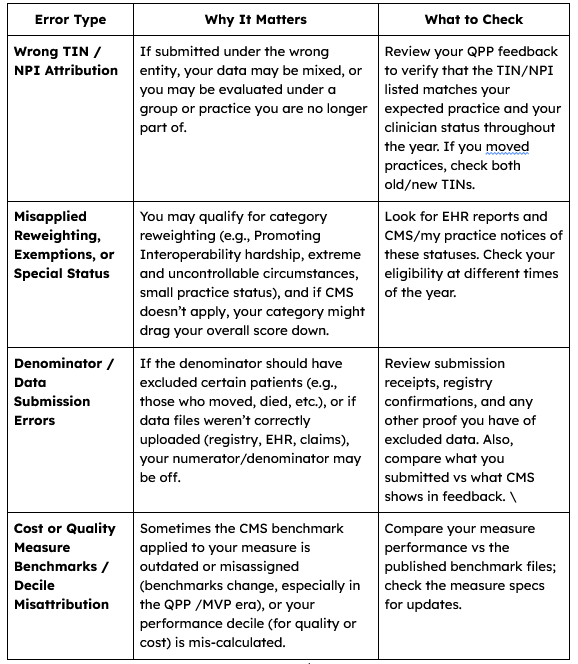
Preparing a Strong Targeted Review Request
These steps strengthen your chances:
Assign Responsibility Early
Decide who in your practice will own this: your compliance lead, your quality officer, or someone in your vendor/registry relationship.
Get Access & Credentials
You’ll need the correct login credentials (HARP / QPP portal). If you’re part of an ACO or another entity, ensure your account has the necessary role rights.
Gather Documentation. Collect everything related to the suspected error:
Data submissions/registry confirmation receipts
EHR exports/audit trails showing what you submitted
Proof of eligibility status (small practice, hardship, rural, etc.)
Communication with vendors, or if parts of the data were delayed or incomplete
Any CMS notices or correspondence you received related to your eligibility, PI hardship, extreme circumstances, etc.
If TIN/NPI changed mid-year, documentation of that change.
Map Out What You Are Disputing
Be very specific: which performance category (Quality, Cost, Promoting Interoperability, Improvement Activities), which measure(s), which data, what benchmark, or what category weight was incorrect. The more precise you are, the easier it is for CMS to review. Avoid vague complaints like “the score is too low.” Instead: “My Cost category score is X, but patients attributed to me include claims under TIN Y, which is not my group; or measure Q’s denominator excluded Z inappropriately.”
Write a Clear Narrative
Beyond documentation, CMS expects you to explain why you believe there is an error, how that error arose, and \what the correct scenario should be with your evidence. If possible, show what the corrected score or payment adjustment would become (a claim-impact estimate). This helps reviewers understand the stakes and verify your case more quickly.
Check for Overlooked Benefits / Adjustments
Sometimes what feels like an error is that something you qualified for (like the Complex Patient Bonus) was not applied, or that a special status (e.g., “non-patient facing,” “small practice,” etc.) wasn’t recognized. Ensure that you build evidence for these points into your request.
The Submission Process
Here’s a step-by-step on how to formally put in the targeted review:
Log in to the QPP portal (via HARP credentials). Navigate to the Targeted Review menu item.
Select “+ Add New Targeted Review,” and specify the level: individual clinician, group, virtual group, or APM entity.
Fill in identifying details: TIN, NPI, or APM ID; contact information of submitter; relationship to entity (clinician, group lead, registry, etc.).
Select the performance categories affected.
Choose the issue type(s): TIN misattribution; reweighting or special status misapplication; denominator error; etc.
Attach all supporting documents. Ensure file names are descriptive. Some documentation may be requested later (by CMS), but prepare as much as possible upfront.
Certify, review, submit. Save the confirmation screenshot or PDF for your records.
What Happens After Submission & What to Monitor
You’ll get a confirmation via the portal/email. The status may initially display as “Draft,” then progress to “Submitted,” and subsequently to “In Review.”
CMS may contact you for additional documentation; please respond promptly. Delayed responses can delay or harm your case.
The review results are final; there is no further appeal. So, the quality of submission matters.
If the review is successful, CMS will update your payment adjustment “as soon as technically feasible.” That means payments may be retroactively corrected. ([AAFP][7])
After the Review: Lessons & Prevention
Even if the review is granted, you want to avoid similar issues going forward. Here are advanced best practices:
Maintain a submission log: every measure, every data file, every vendor submission. Include timestamps and proof (registry acknowledgements, EHR export metadata).
Use audits or mock feedback to simulate what your final feedback will likely show, based on your current performance. Use this to catch anomalous TIN/NPI misattributions.
Review your eligibility and special status earlier in the year and mid-year changes (staff moves, TIN updates, or practice mergers/splits) that may have occurred earlier in the year.
Engage your vendor/registry early to verify what the data they submitted matches your internal reports. Sometimes vendors’ files or registry aggregations drop encounters.
Document all changes in practice structure, clinician affiliation, or service delivery location as they happen. These changes often underlie later disputes.
A Targeted Review isn’t just a backup; it’s a vital tool to ensure your practice isn’t unfairly penalized by administrative or data errors. If you believe your 2024 final MIPS score is wrong, start this process now. Be precise, be organized, and build a strong case. Correcting even one misattributed data file, TIN/NPI mix-up, or missed reweighting can mean meaningful dollars and preserve trust in your quality reporting
Don’t let scoring errors cost your practice revenue. If your 2024 MIPS feedback appears incorrect, initiate the targeted review process today. Our team at Chirpy Bird can help you prepare a strong, evidence-based submission so you protect your performance and payment adjustment. Schedule a call with us now to safeguard your MIPS score.